Human Resource ERP
Run the whole employee lifecycle in one HR system.
One HR ERP from hiring to exit: recruitment, attendance, leave, payroll, appraisals, training and settlement. Recorded once, right on every report and every payslip.
Built and supported by Digital Hyperlinks, Karachi.
Who runs on it
HR and payroll software built for organisations in Pakistan.
Refineries, manufacturing, energy, logistics and non-profits run their people on EZ HR. Different policies, one system underneath.


The problem
HR teams lose the month to the paperwork, not the people.
Three things slow every growing HR department down. EZ HR is built around fixing them.
Attendance lives in spreadsheets
Device logs land in EZ HR directly and are reconciled against shifts, duty times, holidays and approved leave, so the month closes from one source instead of five workbooks.
Payroll is rebuilt from scratch every month
The salary sheet is built from the same attendance, leave, allowance, deduction and tax records your team already maintains, and slips issue from it with a status you can track.
Approvals happen over email and get lost
Leave, attendance, salary change, training and settlement requests each run through a configured approval flow, with activity logs showing who approved what and when.
Our modules
Hire to exit, clock-in to payslip, and the reports that close the month.
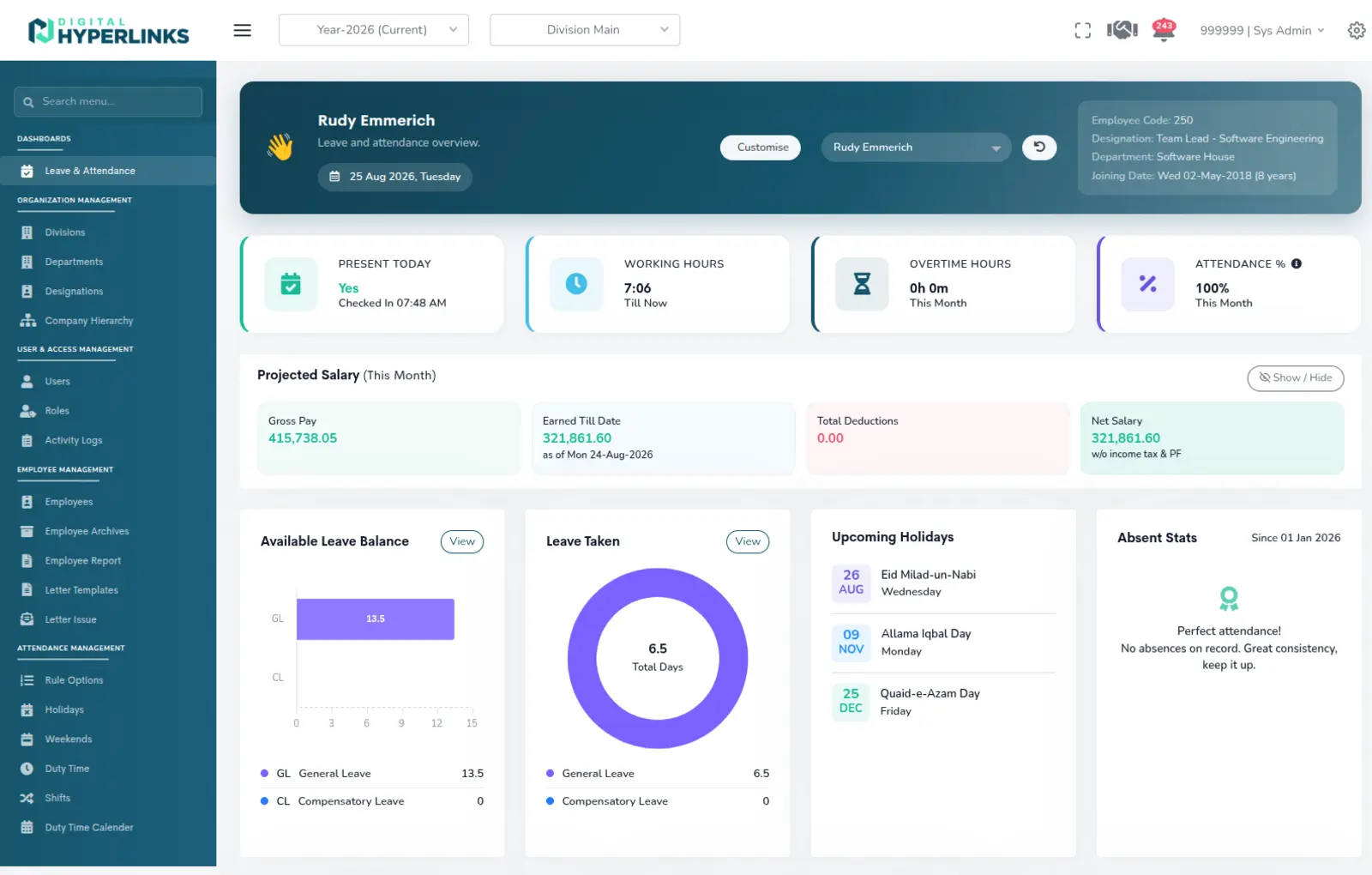
Every module reads the same employee record, so a shift marked on the floor is right on the salary sheet.
Employee Management
One record per employee covering personal, family, education, bank and contract detail, with letter templates, letter issuance, employee reports and an archive for leavers.
Employee Management detailAttendance Management
Attendance logs from your biometric devices, shifts and duty times, holidays and weekends, attendance requests and approvals, locking, and monthly attendance summaries.
Attendance Management detailLeave Management
Leave types, requests and approvals, occurrences, adjustments, encashment and a per-employee leave summary that stays in step with attendance.
Leave Management detailPayroll Management
Allowances, deductions, job groups, salary sheet, salary slips with status tracking, salary change requests and approvals, plus tax, tax adjustment, tax summary and PF summary.
Payroll Management detailPerformance Management
Appraisal periods, my appraisals and team appraisals, appraisal statuses, factor-based appraisal objectives, IPF categories and departmental IPF sheets.
Performance Management detailRecruitment Management
Companies, jobs, candidates, activities, evaluations and candidate sharing, with recruitment dashboards and position-wise consolidated reporting.
Recruitment Management detailLearning & Development
Training plans, topics, categories and modes, nominations and requests, trainers and service providers, attendance, feedback, expenses, vouchers, TNI and certificate records.
Learning & Development detailExpense & Reimbursement
Loan applications and repayments, expense reimbursement and travel expense reimbursement processes, cash management and multi-currency settings.
Expense & Reimbursement detailEmployee Exit & Settlement
Clearance templates, employee exits, my clearances, and final settlements with their own approval route, so nobody leaves with an open item.
Employee Exit & Settlement detailReports & Analytics
Monthly and daily attendance, leave, late, overtime and man-hour reports, monthly status and A/P reports, monthly training, and Excel exports of the lot.
Reports & Analytics detailOrganization & Access
Divisions, departments, designations and company hierarchy, alongside users, roles, activity logs and approval flows that mirror how your organisation signs things off.
Organization & Access detailSystem Administration
System settings, email settings and templates, device management and approval flow configuration, all handled in-app rather than by a developer.
System Administration detailHow it works
Follow one hire from the shortlist to the payslip.
Four screens from the working system, in the order the work happens.
-
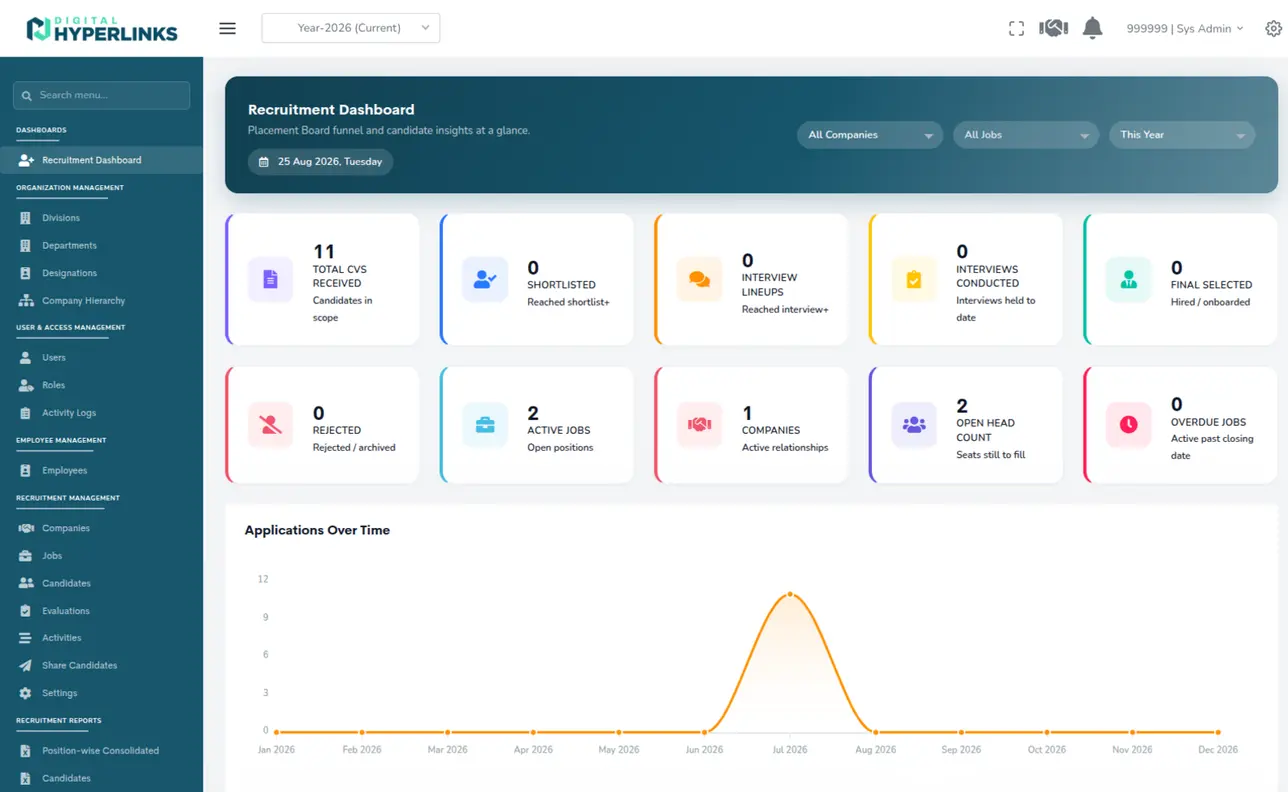
01 · Fill the seat
The pipeline is a funnel, not an inbox.
Jobs, companies and candidates sit in one board, so CVs received, shortlisted, interviewed and hired are counts you can read instead of a mailbox you have to sort.
Swipe the screen to read across
-
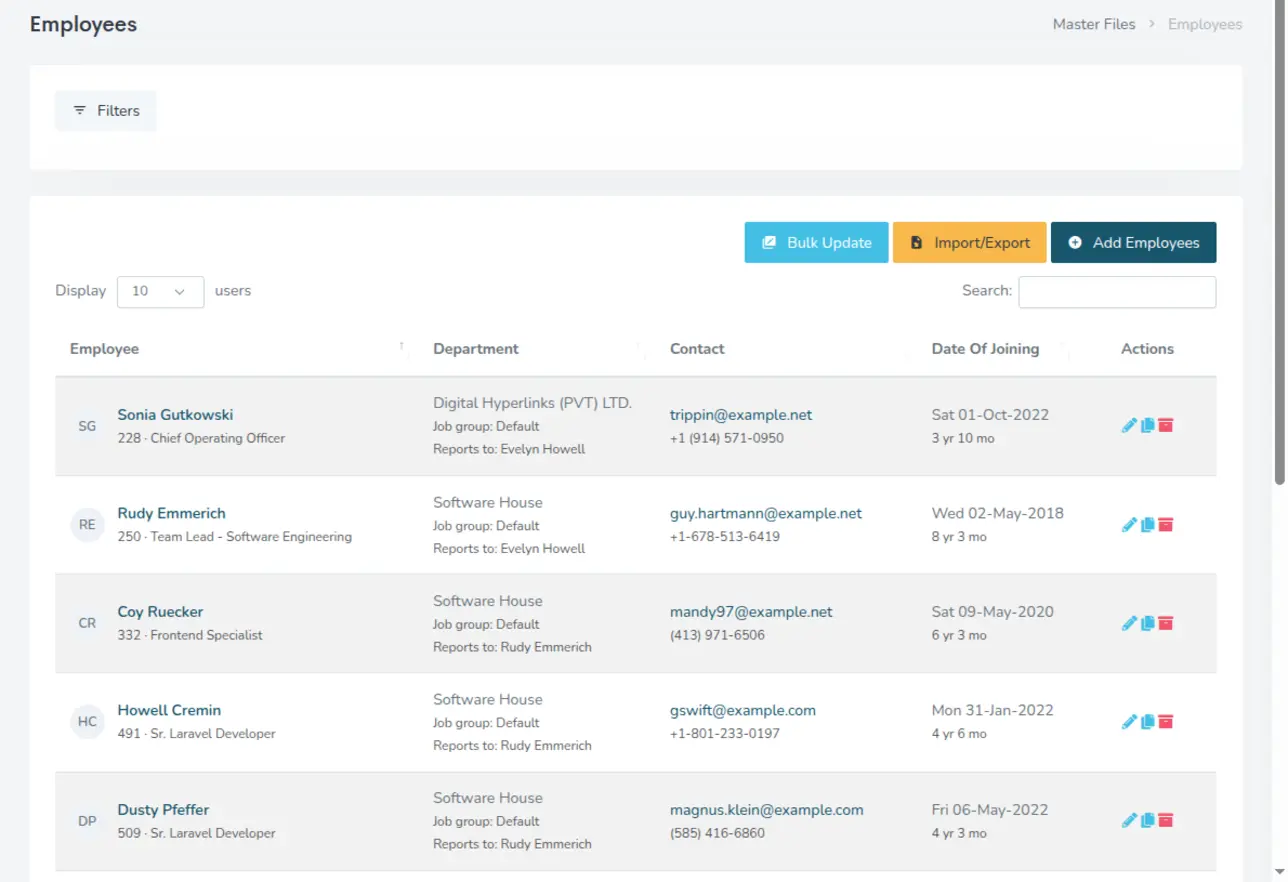
02 · Hire them
One record per employee.
Department, designation, job group, reporting line, contact and joining date are entered once and read by attendance, leave, payroll and appraisals downstream.
Swipe the screen to read across
-
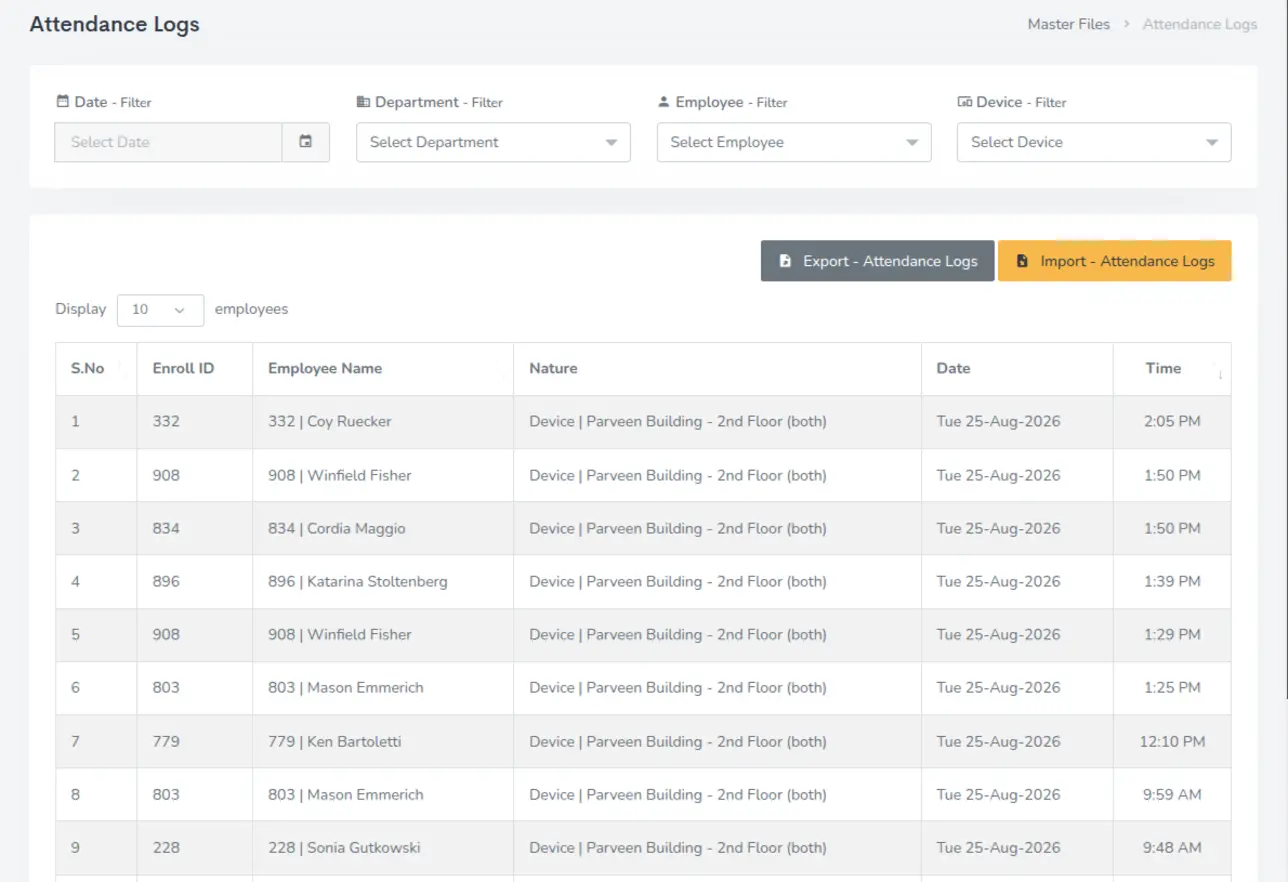
03 · Track the day
Device logs arrive on their own.
Clock-ins and clock-outs land from your biometric devices with employee, device, date and time, and are filtered by date, department, employee or device.
Swipe the screen to read across
-
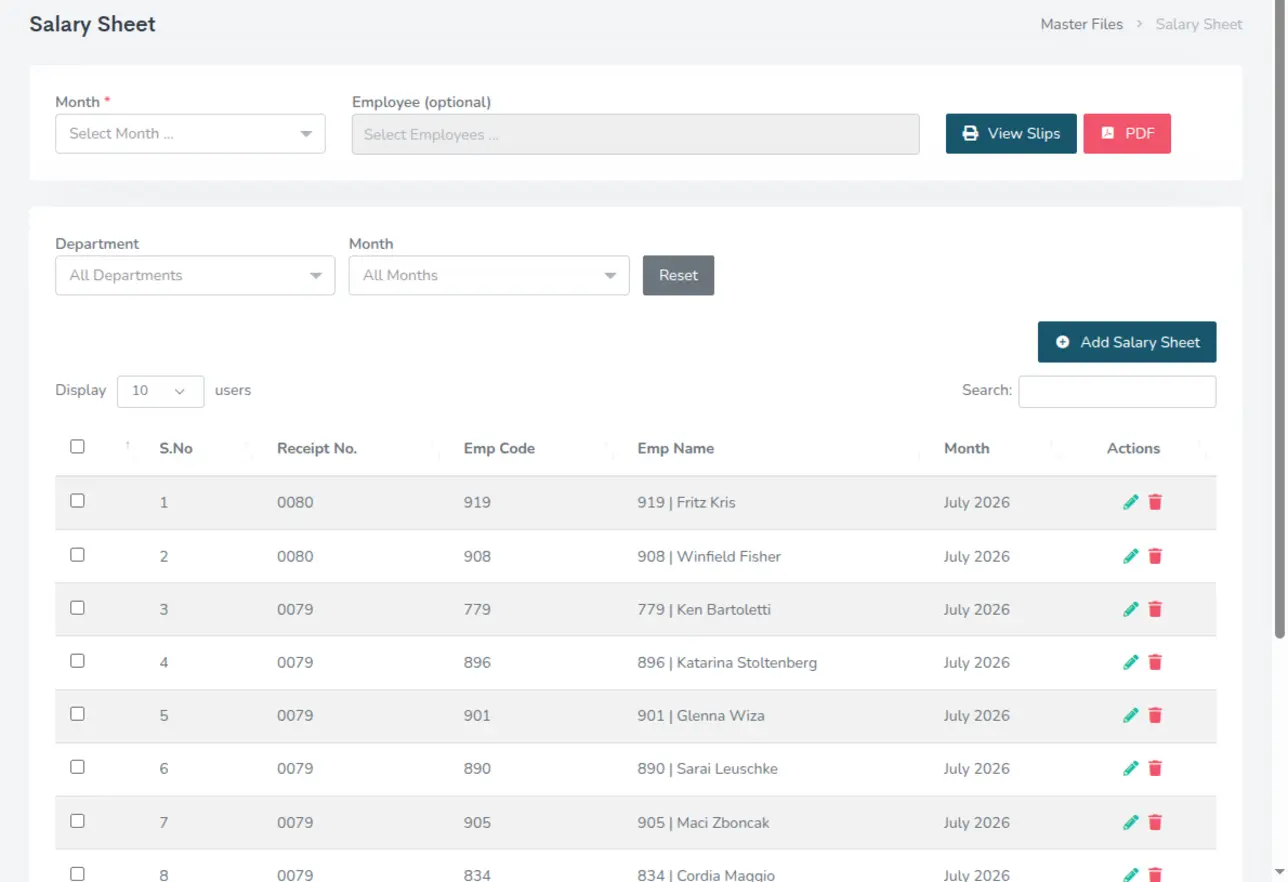
04 · Pay them
The salary sheet is already built.
Each month's sheet lists receipt number, employee code and name, ready to view as slips or export to PDF, filtered by department or month.
Swipe the screen to read across
“EZ HR gave us one record for every employee event: attendance, leave, and the payroll that follows from it. Disputes that used to take a week of reconciliation now get settled from a single screen.”
“We hire in bursts, and the recruitment module keeps that from turning into chaos. Requisition to offer sits in one pipeline, so nobody loses a candidate in an inbox and every approval is on the record.”
“Shift-based operations meant our attendance data never lined up with payroll. EZ HR closed that gap; the month-end run is now a review, not a rebuild.”
Questions
Frequently asked.
- Request a demo and our team walks you through the system against your own HR and payroll workflow, then answers questions live. There is no obligation and no card required.
- Pricing depends on the modules you use and your headcount, so we quote per organisation rather than publishing a fixed tier. Ask for a quote and we will come back with a figure.
- Yes. We mainly integrate with ZKTeco devices and select other models that expose integration support. Devices are registered under device management and their logs feed attendance directly. Bring your device model to the demo and we will confirm the integration.
- Approval flows, roles, divisions, departments, designations and company hierarchy are all configured to your organisation during onboarding, so requests route the way they already do.
- Yes. Employee master data, leave balances and payroll heads are migrated as part of onboarding. Bring a sample export to the demo and we will confirm the fit.
- You do. Your data stays yours, is not shared with other customers, and can be exported at any time.
- Digital Hyperlinks supports the product directly, so you deal with the team that builds it, not a reseller. Training for your HR and payroll staff is part of the rollout.
- EZ HR is part of the same family as EZ Books, EZ Commerce and EZ Club Master, so organisations already running one of those are on familiar ground.
See EZ HR against your own HR process.
A short walkthrough with our team, no obligation. Tell us how your HR and payroll run today and we will show you what changes.
Book a Demo